Product Selections
Product Selections can be used to manage individual assortments for different sales channels. For example, if you like to run multiple brand sites, sell your products in different countries, or operate a network of brick-and-mortar stores. This feature is useful for all those cases, in which the entire product catalog needs to be segmented into assortments that fit the respective sales channel.
Product Selections allow you to control the availability of a Product assortment by activation or deactivation of the respective Product Selection for a specific Store. Your shop frontend then queries only those Product Projections that are scoped to the corresponding Store.
Currently, the Product Projections Search API does not provide Store-specific search requests that are scoped to certain Product Selections, but in this guide we explain how an external search service can be integrated with commercetools Composable Commerce to populate one search index per Store. Instead of this you can populate one search index per Product Selection that allows you to preview assortments that you are planning to launch soon, like the summer collection in a fashion store, before it goes live to the public.
The following diagram shows the relationship of the Product Selection entity to other entities on the Composable Commerce APIs.
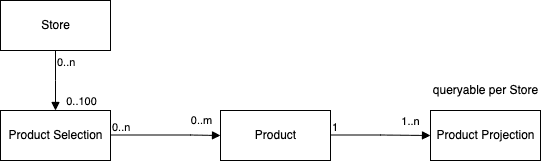
After you have created a Product Selections and added Products and Variants to it, you can go ahead and assign it to one or several Stores.
You can then control the availability of a Product Selection via activation or deactivation of the Product Selection.
In case you have product assortments that are shared among Stores like

we recommend creating a separate, shared Product Selection for the Products that the Stores have in common:
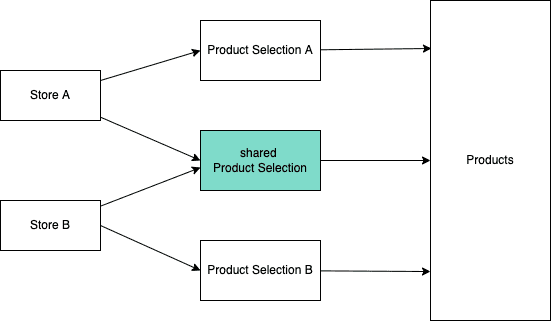
To find out which Products belong to a particular Product Selection, use the Query Products assigned to a Product Selection endpoints. For the opposite case, meaning to find out the Product Selections a particular Product belongs to, use the Query Product Selections for a Product endpoints.
Representations
ProductSelection
idString | Unique identifier of the ProductSelection. |
versionInt | Current version of the ProductSelection. |
keyString | User-defined unique identifier of the ProductSelection. |
name | Name of the ProductSelection. |
productCountInt | Number of Products that are currently assigned to this ProductSelection. |
type | Specifies in which way the Products are assigned to the ProductSelection. Currently, the only way of doing this is to specify each Product individually. Hence, the type is fixed to |
custom | Custom Fields of this ProductSelection. |
createdAt | Date and time (UTC) the ProductSelection was initially created. |
createdBy | Present on resources created after 1/02/2019 except for events not tracked. |
lastModifiedAt | Date and time (UTC) the ProductSelection was last updated. |
lastModifiedBy | Present on resources updated after 1/02/2019 except for events not tracked. |
ProductSelectionDraft
keyString | User-defined unique identifier for the ProductSelection. |
name | Name of the ProductSelection. Not checked for uniqueness, but distinct names are recommended. |
custom | Custom Fields of this ProductSelection. |
ProductSelectionPagedQueryResponse
PagedQueryResult containing an array of ProductSelection.
limitInt | Number of results requested. |
offsetInt | Number of elements skipped. |
countInt | Actual number of results returned. |
totalInt | Total number of results matching the query.
This number is an estimation that is not strongly consistent.
Unlike other endpoints, the Product Selection endpoint does not return this field by default.
To get |
resultsArray of ProductSelection | ProductSelections matching the query. |
ProductSelectionReference
Reference to a ProductSelection.
idString | Unique identifier of the referenced ProductSelection. |
typeIdString | "product-selection"References a ProductSelection. |
obj | Contains the representation of the expanded ProductSelection. Only present in responses to requests with Reference Expansion for ProductSelections. |
ProductSelectionResourceIdentifier
idString | Unique identifier of the referenced ProductSelection. Either |
keyString | User-defined unique identifier of the referenced ProductSelection. Either |
typeIdString | "product-selection"References a ProductSelection. |
ProductSelectionTypeEnum
The following type of Product Selections is supported:
individualFor this type of Product Selections the Products are to be assigned individually by using the Add Product update action.
ProductSelectionProductPagedQueryResponse
PagedQueryResult containing an array of AssignedProductReference.
limitInt | Number of results requested. |
offsetInt | Number of elements skipped. |
countInt | Actual number of results returned. |
totalInt | Total number of results matching the query.
This number is an estimation that is not strongly consistent.
Unlike other endpoints, the Product Selection endpoint does not return this field by default.
To get |
resultsArray of AssignedProductReference | References to Products that are assigned to the ProductSelection. |
ProductsInStorePagedQueryResponse
PagedQueryResult containing an array of ProductSelectionAssignment.
limitInt | Number of results requested. |
offsetInt | Number of elements skipped. |
countInt | Actual number of results returned. |
totalInt | Total number of results matching the query.
This number is an estimation that is not strongly consistent.
Unlike other endpoints, the Product Selection endpoint does not return this field by default.
To get |
resultsArray of ProductSelectionAssignment | ProductSelectionAssignments matching the query. |
ProductSelectionAssignment
Specifies which Product is assigned to which ProductSelection.
product | Reference to a Product that is assigned to the ProductSelection. |
productSelection | Reference to the Product Selection that this assignment is part of. |
variantSelection | Selects which Variants of the newly added Product will be included, or excluded, from the Product Selection. |
AssignedProductSelection
productSelection | Reference to the Product Selection that this assignment is part of. |
variantSelection | Selects which Variants of the newly added Product will be included, or excluded, from the Product Selection. |
AssignedProductSelectionPagedQueryResponse
PagedQueryResult containing an array of AssignedProductSelection.
limitInt | Number of results requested. |
offsetInt | Number of elements skipped. |
countInt | Actual number of results returned. |
totalInt | Total number of results matching the query.
This number is an estimation that is not strongly consistent.
Unlike other endpoints, the Product Selection endpoint does not return this field by default.
To get |
resultsArray of AssignedProductSelection | References to ProductSelection that are assigned to the Product. |
AssignedProductReference
product | Reference to a Product that is assigned to the Product Selection. |
variantSelection | The Variants of the Product that are included, or excluded, from the Product Selection. In absence of this field, all Variants are deemed to be included. |
IndividualProductSelectionType
typeString | "individual"For this type of Product Selections the Products are to be assigned individually by using the Add Product update action. |
name | The name of the ProductSelection which is recommended to be unique. |
ProductVariantSelection
Polymorphic base type to determine which Product Variants are included or excluded from a Product Selection.
ProductVariantSelection Inclusion
Only Product Variants with explicitly stated SKUs are part of the Product Selection.
typeString | "inclusion" |
skusArray of String | Non-empty array of SKUs representing Product Variants to be included into the Product Selection. |
ProductVariantSelection Exclusion
All Product Variants except the explicitly stated SKUs are part of the Product Selection.
typeString | "exclusion" |
skusArray of String | Non-empty array of SKUs representing Product Variants to be excluded from the Product Selection. |
Get Product Selection
Get Product Selection by ID
view_product_selections:{projectKey}regionString | Region in which the Project is hosted. |
projectKeyString |
|
idString |
|
expand | The parameter can be passed multiple times. |
curl -X GET https://api.{region}.commercetools.com/{projectKey}/product-selections/{id} -i \--header 'Authorization: Bearer ${BEARER_TOKEN}'
{"type" : "individual","id" : "dbd58c4a-7b2c-4b45-8134-c95bfd322d05","version" : 1,"createdAt" : "2021-06-27T10:12:16.154Z","lastModifiedAt" : "2021-06-27T10:12:16.154Z","lastModifiedBy" : {"clientId" : "gqjDgvivRSfJ4fCrk6Lu3j7x","isPlatformClient" : false},"createdBy" : {"clientId" : "gqjDgvivRSfJ4fCrk6Lu3j7x","isPlatformClient" : false},"key" : "finest-selection","name" : {"en" : "Finest Selection"},"custom" : {"type" : {"typeId" : "type","id" : "3ae9bcca-df23-443e-bd22-0c592f9694fa"},"fields" : {"description" : "my description"}},"productCount" : 909}
Get Product Selection by Key
view_product_selections:{projectKey}regionString | Region in which the Project is hosted. |
projectKeyString |
|
keyString |
|
expand | The parameter can be passed multiple times. |
curl -X GET https://api.{region}.commercetools.com/{projectKey}/product-selections/key={key} -i \--header 'Authorization: Bearer ${BEARER_TOKEN}'
{"type" : "individual","id" : "dbd58c4a-7b2c-4b45-8134-c95bfd322d05","version" : 1,"createdAt" : "2021-06-27T10:12:16.154Z","lastModifiedAt" : "2021-06-27T10:12:16.154Z","lastModifiedBy" : {"clientId" : "gqjDgvivRSfJ4fCrk6Lu3j7x","isPlatformClient" : false},"createdBy" : {"clientId" : "gqjDgvivRSfJ4fCrk6Lu3j7x","isPlatformClient" : false},"key" : "finest-selection","name" : {"en" : "Finest Selection"},"custom" : {"type" : {"typeId" : "type","id" : "3ae9bcca-df23-443e-bd22-0c592f9694fa"},"fields" : {"description" : "my description"}},"productCount" : 909}
Query Product Selections
view_product_selections:{projectKey}regionString | Region in which the Project is hosted. |
projectKeyString |
|
where | The parameter can be passed multiple times. |
/^var[.][a-zA-Z0-9]+$/Any string parameter matching this regular expression | Predicate parameter values. The parameter can be passed multiple times. |
sort | The parameter can be passed multiple times. |
expand | The parameter can be passed multiple times. |
limitInt | Number of results requested. |
offsetInt | Number of elements skipped. |
withTotalBoolean | Controls the calculation of the total number of query results. Set to |
curl -X GET https://api.{region}.commercetools.com/{projectKey}/product-selections -i \--header 'Authorization: Bearer ${BEARER_TOKEN}'
{"limit" : 20,"offset" : 0,"count" : 2,"total" : 2,"results" : [ {"type" : "individual","id" : "4b984295-82e7-4404-aa68-467a12f10ba9","version" : 5,"createdAt" : "2021-06-23T09:33:21.010Z","lastModifiedAt" : "2021-06-24T12:07:21.326Z","lastModifiedBy" : {"isPlatformClient" : true,"user" : {"typeId" : "user","id" : "4cd2cb89-7d23-4306-87a4-1d8b0db3845d"}},"createdBy" : {"isPlatformClient" : true,"user" : {"typeId" : "user","id" : "4cd2cb89-7d23-4306-87a4-1d8b0db3845d"}},"key" : "my-selection","name" : {"en" : "My Product Selection"},"custom" : {"type" : {"typeId" : "type","id" : "3ae9bcca-df23-443e-bd22-0c592f9694fa"},"fields" : {"description" : "my description"}},"productCount" : 0}, {"type" : "individual","id" : "dbd58c4a-7b2c-4b45-8134-c95bfd322d05","version" : 1,"createdAt" : "2021-06-27T10:12:16.154Z","lastModifiedAt" : "2021-06-27T10:12:16.154Z","lastModifiedBy" : {"clientId" : "gqjDgvivRSfJ4fCrk6Lu3j7x","isPlatformClient" : false},"createdBy" : {"clientId" : "gqjDgvivRSfJ4fCrk6Lu3j7x","isPlatformClient" : false},"key" : "finest-selection","name" : {"en" : "Finest Selection"},"productCount" : 1} ]}
Query Products assigned to a Product Selection
by ID
By default, the response does not include the total field.
To get total included, pass the query parameter withTotal set to true.
view_product_selections:{projectKey}regionString | Region in which the Project is hosted. |
projectKeyString |
|
idString |
|
expand | The parameter can be passed multiple times. |
limitInt | Number of results requested. |
offsetInt | Number of elements skipped. |
withTotalBoolean | Controls the calculation of the total number of query results. Set to |
curl -X GET https://api.{region}.commercetools.com/{projectKey}/product-selections/{id}/products -i \--header 'Authorization: Bearer ${BEARER_TOKEN}'
{"limit" : 20,"offset" : 0,"count" : 2,"results" : [ {"product" : {"typeId" : "product","id" : "72dcfd13-92e8-4fa1-bd01-926a646bfb30"},"variantSelection" : {"type" : "inclusion","skus" : [ "M0E20000000E1PI" ]}}, {"product" : {"typeId" : "product","id" : "2a38796b-0bb1-4a4f-8b0d-bf6e8f6661a7"},"variantSelection" : {"type" : "inclusion","skus" : [ "M0E20000000E1PJ" ]}} ]}
by Key
By default, the response does not include the total field.
To get total included, pass the query parameter withTotal set to true.
view_product_selections:{projectKey}regionString | Region in which the Project is hosted. |
projectKeyString |
|
keyString |
|
expand | The parameter can be passed multiple times. |
limitInt | Number of results requested. |
offsetInt | Number of elements skipped. |
withTotalBoolean | Controls the calculation of the total number of query results. Set to |
curl -X GET https://api.{region}.commercetools.com/{projectKey}/product-selections/key={key}/products -i \--header 'Authorization: Bearer ${BEARER_TOKEN}'
{"limit" : 20,"offset" : 0,"count" : 2,"results" : [ {"product" : {"typeId" : "product","id" : "72dcfd13-92e8-4fa1-bd01-926a646bfb30"},"variantSelection" : {"type" : "inclusion","skus" : [ "M0E20000000E1PI" ]}}, {"product" : {"typeId" : "product","id" : "2a38796b-0bb1-4a4f-8b0d-bf6e8f6661a7"},"variantSelection" : {"type" : "inclusion","skus" : [ "M0E20000000E1PJ" ]}} ]}
Query Products available in a Store through active Product Selections
Queries Product Selection assignments in a specific Store.
The response will include duplicate Products whenever more than one active Product Selection of the Store includes a Product. To make clear through which Product Selection a Product is available in the Store the response contains assignments including both the Product and the Product Selection. Only Products of Product Selections that are activated in Store will be returned.
view_product_selections:{projectKey}regionString | Region in which the Project is hosted. |
projectKeyString |
|
storeKeyString |
|
expand | The parameter can be passed multiple times. |
limitInt | Number of results requested. |
offsetInt | Number of elements skipped. |
withTotalBoolean | By default, the response does not include the |
curl -X GET https://api.{region}.commercetools.com/{projectKey}/in-store/key={storeKey}/product-selection-assignments -i \--header 'Authorization: Bearer ${BEARER_TOKEN}'
{"limit" : 20,"offset" : 0,"count" : 1,"results" : [ {"productSelection" : {"id" : "3a914b5c-4b87-42ce-998c-91e5aa7a329f","typeId" : "product-selection"},"product" : {"id" : "d1c99e83-b9d4-48b2-9441-108c2a47009b","typeId" : "product"}} ]}
Create Product Selection
manage_product_selections:{projectKey}regionString | Region in which the Project is hosted. |
projectKeyString |
|
expand | The parameter can be passed multiple times. |
curl -X POST https://api.{region}.commercetools.com/{projectKey}/product-selections -i \--header 'Authorization: Bearer ${BEARER_TOKEN}' \--header 'Content-Type: application/json' \--data-binary @- << DATA{"key" : "finest-selection","name" : {"en" : "Finest Selection"}}DATA
{"type" : "individual","id" : "dbd58c4a-7b2c-4b45-8134-c95bfd322d05","version" : 1,"createdAt" : "2021-06-27T10:12:16.154Z","lastModifiedAt" : "2021-06-27T10:12:16.154Z","lastModifiedBy" : {"clientId" : "gqjDgvivRSfJ4fCrk6Lu3j7x","isPlatformClient" : false},"createdBy" : {"clientId" : "gqjDgvivRSfJ4fCrk6Lu3j7x","isPlatformClient" : false},"key" : "finest-selection","name" : {"en" : "Finest Selection"},"custom" : {"type" : {"typeId" : "type","id" : "3ae9bcca-df23-443e-bd22-0c592f9694fa"},"fields" : {"description" : "my description"}},"productCount" : 909}
Update Product Selection
Update Product Selection by ID
manage_product_selections:{projectKey}regionString | Region in which the Project is hosted. |
projectKeyString |
|
idString |
|
expand | The parameter can be passed multiple times. |
versionInt | |
actionsArray of ProductSelectionUpdateAction |
curl -X POST https://api.{region}.commercetools.com/{projectKey}/product-selections/{id} -i \--header 'Authorization: Bearer ${BEARER_TOKEN}' \--header 'Content-Type: application/json' \--data-binary @- << DATA{"version" : 1,"actions" : [ {"action" : "changeName","name" : {"en" : "new selection name"}} ]}DATA
{"type" : "individual","id" : "dbd58c4a-7b2c-4b45-8134-c95bfd322d05","version" : 1,"createdAt" : "2021-06-27T10:12:16.154Z","lastModifiedAt" : "2021-06-27T10:12:16.154Z","lastModifiedBy" : {"clientId" : "gqjDgvivRSfJ4fCrk6Lu3j7x","isPlatformClient" : false},"createdBy" : {"clientId" : "gqjDgvivRSfJ4fCrk6Lu3j7x","isPlatformClient" : false},"key" : "finest-selection","name" : {"en" : "Finest Selection"},"custom" : {"type" : {"typeId" : "type","id" : "3ae9bcca-df23-443e-bd22-0c592f9694fa"},"fields" : {"description" : "my description"}},"productCount" : 909}
Update Product Selection by Key
manage_product_selections:{projectKey}regionString | Region in which the Project is hosted. |
projectKeyString |
|
keyString |
|
expand | The parameter can be passed multiple times. |
versionInt | |
actionsArray of ProductSelectionUpdateAction |
curl -X POST https://api.{region}.commercetools.com/{projectKey}/product-selections/key={key} -i \--header 'Authorization: Bearer ${BEARER_TOKEN}' \--header 'Content-Type: application/json' \--data-binary @- << DATA{"version" : 1,"actions" : [ {"action" : "changeName","name" : {"en" : "new selection name"}} ]}DATA
{"type" : "individual","id" : "dbd58c4a-7b2c-4b45-8134-c95bfd322d05","version" : 1,"createdAt" : "2021-06-27T10:12:16.154Z","lastModifiedAt" : "2021-06-27T10:12:16.154Z","lastModifiedBy" : {"clientId" : "gqjDgvivRSfJ4fCrk6Lu3j7x","isPlatformClient" : false},"createdBy" : {"clientId" : "gqjDgvivRSfJ4fCrk6Lu3j7x","isPlatformClient" : false},"key" : "finest-selection","name" : {"en" : "Finest Selection"},"custom" : {"type" : {"typeId" : "type","id" : "3ae9bcca-df23-443e-bd22-0c592f9694fa"},"fields" : {"description" : "my description"}},"productCount" : 909}
Update actions
Add Product
Adds a Product to the Product Selection. If the given Product is already assigned to the Product Selection with the same Variant Selection nothing happens but if the existing Assignment has a different Variant Selection ProductPresentWithDifferentVariantSelection is raised.'
actionString | "addProduct" |
product | ResourceIdentifier of the Product |
variantSelection | Selects which Variants of the newly added Product will be included, or excluded, from the Product Selection. If not supplied all Variants are deemed to be included. |
{"action" : "addProduct","product" : {"typeId" : "product","key" : "millennium-falcon"},"variantSelection" : {"type" : "inclusion","skus" : [ "metallic-white" ]}}
Set Variant Selection
Updates the Product Variant Selection of an existing Product Selection Assignment. If the given Product is not assigned to the Product Selection ProductAssignmentMissing error is raised.
actionString | "setVariantSelection" |
product | ResourceIdentifier of the Product |
variantSelection | Determines which Variants of the previously added Product are to be included in, or excluded from, the Product Selection. Leave it empty to unset an existing Variant Selection. |
{"action" : "setVariantSelection","product" : {"typeId" : "product","key" : "millennium-falcon"},"variantSelection" : {"type" : "inclusion","skus" : [ "M0E20000000EH3V" ]}}
Remove Product
actionString | "removeProduct" |
product | ResourceIdentifier of the Product |
{"action" : "removeProduct","product" : {"typeId" : "product","key" : "millennium-falcon"}}
Set Key
actionString | "setKey" |
keyString | If |
{"action" : "setKey","key" : "ProductSelectionKey"}
Change Name
actionString | "changeName" |
name | The new name to be set for the ProductSelection. |
{"action" : "changeName","name" : {"en" : "My Product Selection","de" : "Meine Product Selection"}}
Set Custom Type
actionString | "setCustomType" |
type | Defines the Type that extends the ProductSelection with Custom Fields. If absent, any existing Type and Custom Fields are removed from the ProductSelection. |
fields | Sets the Custom Fields fields for the ProductSelection. |
{"action" : "setCustomType","type" : {"id" : "{{type-id}}","typeId" : "type"},"fields" : {"examplaryStringTypeField" : "TextString"}}
Set CustomField
actionString | "setCustomField" |
nameString | Name of the Custom Field. |
value | If |
{"action" : "setCustomField","name" : "ExamplaryStringTypeField","value" : "TextString"}
Delete Product Selection
Delete Product Selection by ID
Deletion will only succeed if the Product Selection is not assigned to any Store.
manage_product_selections:{projectKey}regionString | Region in which the Project is hosted. |
projectKeyString |
|
idString |
|
versionInt | Last seen version of the resource. |
expand | The parameter can be passed multiple times. |
curl -X DELETE https://api.{region}.commercetools.com/{projectKey}/product-selections/{id}?version={version} -i \--header 'Authorization: Bearer ${BEARER_TOKEN}'
{"type" : "individual","id" : "dbd58c4a-7b2c-4b45-8134-c95bfd322d05","version" : 1,"createdAt" : "2021-06-27T10:12:16.154Z","lastModifiedAt" : "2021-06-27T10:12:16.154Z","lastModifiedBy" : {"clientId" : "gqjDgvivRSfJ4fCrk6Lu3j7x","isPlatformClient" : false},"createdBy" : {"clientId" : "gqjDgvivRSfJ4fCrk6Lu3j7x","isPlatformClient" : false},"key" : "finest-selection","name" : {"en" : "Finest Selection"},"custom" : {"type" : {"typeId" : "type","id" : "3ae9bcca-df23-443e-bd22-0c592f9694fa"},"fields" : {"description" : "my description"}},"productCount" : 909}
Delete Product Selection by Key
Deletion will only succeed if the Product Selection is not assigned to any Store.
manage_product_selections:{projectKey}regionString | Region in which the Project is hosted. |
projectKeyString |
|
keyString |
|
versionInt | Last seen version of the resource. |
expand | The parameter can be passed multiple times. |
curl -X DELETE https://api.{region}.commercetools.com/{projectKey}/product-selections/key={key}?version={version} -i \--header 'Authorization: Bearer ${BEARER_TOKEN}'
{"type" : "individual","id" : "dbd58c4a-7b2c-4b45-8134-c95bfd322d05","version" : 1,"createdAt" : "2021-06-27T10:12:16.154Z","lastModifiedAt" : "2021-06-27T10:12:16.154Z","lastModifiedBy" : {"clientId" : "gqjDgvivRSfJ4fCrk6Lu3j7x","isPlatformClient" : false},"createdBy" : {"clientId" : "gqjDgvivRSfJ4fCrk6Lu3j7x","isPlatformClient" : false},"key" : "finest-selection","name" : {"en" : "Finest Selection"},"custom" : {"type" : {"typeId" : "type","id" : "3ae9bcca-df23-443e-bd22-0c592f9694fa"},"fields" : {"description" : "my description"}},"productCount" : 909}